
TL;DR:
- Customer journey mapping significantly increases customer retention and reduces operational costs.
- Effective maps incorporate customer emotions, behaviors, and touchpoints, guiding automation opportunities.
- Integrating journey maps into operational workflows and frequently updating them drives measurable business improvements.
Companies using customer journey mapping see 55% customer retention compared to just 21% for those without it — a 2.6x gap that shows up directly in revenue and operating costs. Yet most enterprise operations managers still rely on internal process diagrams that track system handoffs but miss the full picture of what customers actually experience. Customer journey mapping changes that. It connects operational workflows to real customer behavior, revealing friction points that dashboards and SLAs simply don’t surface. This guide explains what journey mapping is, how to build one, and how AI-driven automation transforms map insights into measurable operational gains.
Table of Contents
- What is customer journey mapping?
- How the customer journey mapping process works
- Why journey mapping matters for AI-driven process automation
- Addressing common journey mapping challenges and modern nuances
- Best practices and tips for sustainable customer journey mapping
- The overlooked truth: Journey mapping is an operating model, not just a diagram
- Ready to power up your operations with intelligent automation?
- Frequently asked questions
Key Takeaways
| Point | Details |
|---|---|
| Visualize end-to-end experience | Customer journey mapping shows every customer touchpoint, emotion, and pain area for a holistic picture. |
| Drive AI automation value | Mapping reveals process friction and automation opportunities, fueling efficiency and retention gains. |
| Keep journey maps up to date | Review and refresh maps biannually to reflect changes in customer behavior and business strategy. |
| Operationalize for real impact | Tie journey maps directly to operational KPIs, making them a foundation for sustainable process improvement. |
What is customer journey mapping?
Customer journey mapping is more than a visualization tool. A journey map is a visual representation of every step, touchpoint, emotion, and pain point a customer goes through when interacting with your organization, from their first awareness of your brand all the way through post-purchase advocacy. That definition matters because most enterprises already have process maps. What they lack is the customer lens layered on top.
Think of the difference this way. A process diagram tracks what your systems do. A journey map tracks what your customer feels, does, and decides at every stage of that same interaction. Both matter. But only one tells you why customers abandon a renewal, why they escalate tickets at a specific step, or why onboarding completion rates stall at week two.
The core components of a journey map include:
- Personas: Detailed profiles of customer segments based on real behavioral data, not assumptions
- Journey stages: Typically five phases including awareness, consideration, purchase, retention, and advocacy
- Touchpoints: Every channel or moment where the customer interacts with your brand, from sales calls to support emails to invoice portals
- Emotions and pain points: Documented friction at each stage, including frustration, confusion, and unmet expectations
- Improvement opportunities: Prioritized areas where process changes or automation can close gaps
This structure is what separates journey mapping from a standard flowchart. It captures the human dimension of your operations. That human dimension is exactly where AI automation finds its most powerful leverage. Strong customer engagement strategies depend on understanding these layers before you start automating anything.
“A journey map without personas and emotion data is just a swimlane diagram with better fonts. The difference is whether it can actually change decisions.”
The misconception to avoid is treating the map as a one-time deliverable. It’s a working document that evolves alongside your customer base and your operational capabilities.
How the customer journey mapping process works
With the fundamentals clear, here’s how enterprises can build effective journey maps step by step.
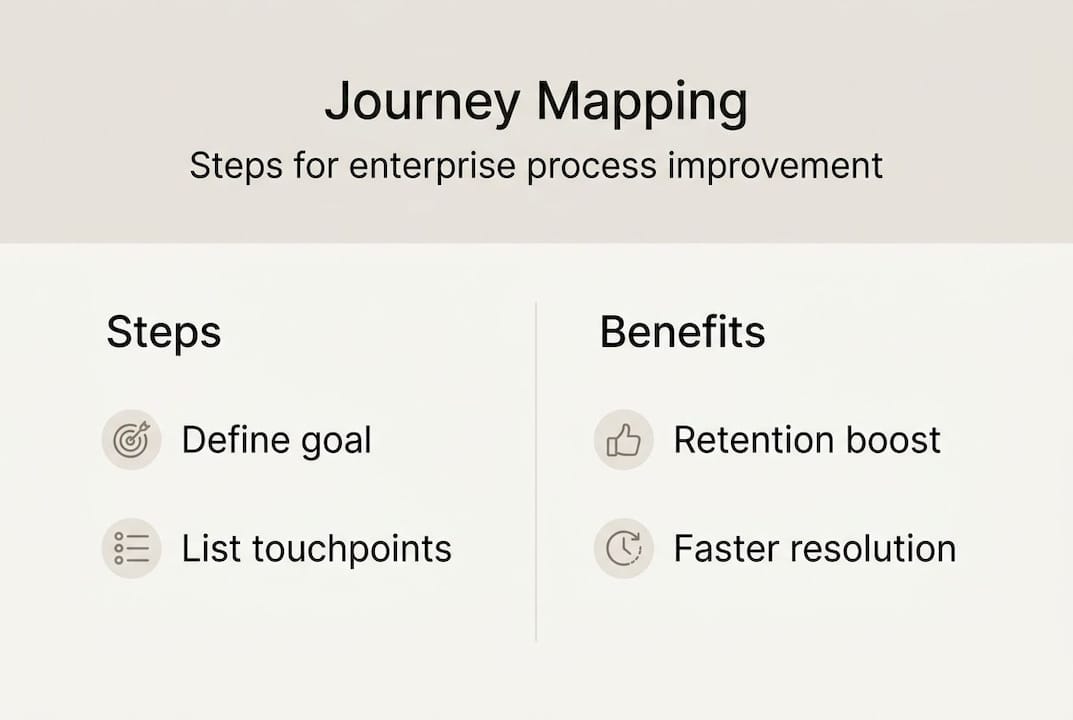
The standard process covers six to eight steps: define your purpose, research your audience, identify stages, list touchpoints, capture emotions and motivations, identify opportunities, visualize the map, and then treat the whole thing as a living document that gets updated regularly. That last point trips up most enterprise teams. The map doesn’t end at publication.
A critical nuance for enterprise environments is mixing data sources. Effective journey mapping combines quantitative data from analytics and CRM systems with qualitative data from customer interviews and support transcripts. Neither source is sufficient alone. Analytics tells you where customers drop off. Interviews tell you why. You need both to make your map actionable.
Here’s a practical breakdown of the process:
- Define the mapping goal — Are you reducing churn, improving onboarding, or cutting support volume? Narrow the scope before you start.
- Build your primary persona — Start with one customer segment based on your highest-volume or highest-risk cohort.
- Map the current-state journey — Document what actually happens today, not what your process diagrams say should happen.
- Gather mixed data — Pull from support tickets, NPS responses, call recordings, and behavioral analytics simultaneously.
- Identify emotional low points — Mark every stage where frustration, confusion, or delay is documented.
- Flag automation candidates — Tag touchpoints where rules-based decisions, repetitive tasks, or predictable bottlenecks exist.
- Validate with real customers — Share draft maps with actual customers or frontline staff before finalizing anything.
- Assign ownership and iterate — Assign each improvement opportunity to a team and schedule a review cadence.
| Step | Key stakeholders | Useful tools |
|---|---|---|
| Define goal | Operations, CX leadership | Objectives framework |
| Build persona | Customer success, marketing | CRM segmentation |
| Map current state | Operations, frontline teams | Journey mapping software |
| Gather data | Analytics, support | BI platforms, ticketing systems |
| Identify pain points | Cross-functional team | Affinity mapping |
| Flag automation candidates | Operations, IT | Process mining tools |
| Validate | Real customers, field teams | Interviews, surveys |
| Iterate | All stakeholders | Review cadence |
Pro Tip: Never finalize a journey map based solely on internal team input. Validate your emotional pain point assumptions directly with customers through interviews or session replay tools before tying any automation decisions to those insights.

Connecting these steps to AI-driven marketing strategies helps enterprise teams align customer-facing improvements with operational execution from the start.
Why journey mapping matters for AI-driven process automation
Understanding the methodology sets the stage for seeing how journey mapping powers real improvements with AI, which is a genuine game-changer for enterprise operations managers dealing with fragmented workflows.
The most important thing journey mapping does for automation teams is reveal where to automate. Not all friction points are equal. Some are caused by system delays. Others come from unclear communication. Others from missing data at decision points. Mapping surfaces these process friction points so AI-driven workflow tools can target the right moments, whether that’s triggering automated onboarding nudges when a customer stalls at a specific step, or deploying a workflow bot to handle approval loops that slow down contract execution.
The results are concrete. AI-enhanced journey programs deliver 25% retention improvements and 30% faster issue resolutions. Those aren’t marginal gains. They translate directly to reduced support costs, lower churn, and faster revenue cycles.
Here’s how the numbers stack up between mapped-and-automated operations versus traditional approaches:
| Approach | Retention rate | Cost reduction | Resolution speed |
|---|---|---|---|
| No mapping, no automation | ~21% | Baseline | Baseline |
| Journey mapping only | ~55% | 15-25% | Moderate improvement |
| Journey mapping plus AI automation | Up to 80%+ | 25-35%+ | 30% faster |
The compounding effect is significant. Mapping alone improves outcomes because it forces clarity on customer pain. Adding AI automation to those insights multiplies the impact because you’re targeting the right moments with the right intervention at scale.
For example, an enterprise with a complex B2B onboarding process might discover through mapping that customers consistently stall at the data migration step. Without mapping, that shows up only as a delayed activation metric. With mapping, the specific friction is visible. With AI automation, you can trigger a proactive check-in workflow the moment a customer’s progress hasn’t advanced for 48 hours, assign a success rep automatically, and pre-populate the next steps with customer-specific guidance.
Pro Tip: After completing a journey map, convert each identified pain point into a KPI with a baseline measurement. Then track those KPIs before and after deploying automation so you can quantify the direct operational impact and justify further investment.
Pairing journey insights with AI SEO and conversion strategies creates an end-to-end view of how customers arrive, engage, and convert, which sharpens both acquisition and retention efforts simultaneously.
Addressing common journey mapping challenges and modern nuances
While the benefits are clear, the journey mapping process itself faces modern challenges that enterprises must proactively manage.
The complexity of enterprise journeys is growing fast. B2B customer journeys now average 266 touchpoints, up 20% year over year. Customers don’t move linearly through stages anymore. They bounce between awareness and consideration. They engage with support mid-onboarding. They revisit pricing pages during renewal. A static map built on a five-stage linear model misses most of this reality.
The second big challenge is map shelf life. Journey maps built without a refresh cycle become outdated within six months. Customer behaviors shift. New channels emerge. Regulatory changes alter touchpoints. An outdated map doesn’t just fail to help — it actively misleads automation decisions if teams rely on stale friction data to deploy workflows.
Traditional static journey mapping is struggling to keep up in what researchers call a BANI (brittle, anxious, nonlinear, incomprehensible) environment. The shift toward AI-powered journey intelligence and real-time orchestration is solving this, but it introduces its own risks: algorithmic bias in automated decisions, over-automation that removes necessary human judgment, and data silos that prevent a unified customer view.
Common pitfalls to avoid:
- Building maps from internal assumptions rather than behavioral data and direct customer input
- Skipping the emotional layer and treating the map as a pure process diagram
- Over-automating sensitive touchpoints like complaint resolution or contract disputes where human judgment is required
- Failing to connect maps to ownership so no team is responsible for acting on identified opportunities
- Ignoring edge-case personas like churned customers or high-complexity enterprise accounts whose journeys reveal systemic issues
“The future of journey mapping isn’t a better PowerPoint slide. It’s a real-time operational signal layer that triggers decisions across your CRM, support platform, and billing system simultaneously.”
Addressing these challenges requires treating journey maps as marketing automation advantages infrastructure, not just a CX exercise. When maps feed live data into automation systems, they become genuinely dynamic.
Best practices and tips for sustainable customer journey mapping
To ensure journey mapping delivers ongoing value, follow these best-practice tips from experienced enterprise leaders.
The most important rule is to base maps on behavioral data, not assumptions. Effective journey maps rely on analytics, support tickets, and actual customer interactions — not what internal teams believe customers experience. Operations managers who skip this step end up automating the wrong friction points and wondering why resolution times didn’t improve.
Here’s a sustainable best-practice framework:
- Anchor every pain point to a data source — If you can’t cite a ticket trend, an analytics drop-off, or a direct customer quote, the pain point doesn’t go on the map.
- Connect each opportunity to a specific KPI — Don’t just identify friction. Assign a metric that will move if you fix it. This turns the map into a management tool, not just a visualization.
- Schedule biannual map audits — Block time every six months to review the map against fresh data. Assign someone to own the audit process.
- Build your automation roadmap directly from the map — Use the ranked improvement opportunities as your automation backlog so that engineering and operations priorities stay aligned.
- Involve frontline teams in every major revision — Your support reps, account managers, and field teams see customer friction every day. They should be co-authors of the map, not just reviewers.
- Start narrow, then expand — Begin with your highest-volume customer segment and your most painful stage. Build confidence with a focused map before scaling to multiple personas.
Pro Tip: Set a rule that no automation project can be scoped without a linked journey map entry. This creates organizational discipline around identifying customer impact before deploying any workflow change.
Connecting map outputs to AI efficiency and ROI metrics ensures that every mapping investment produces a traceable business outcome, not just a workshop deliverable.
Sustainable mapping programs share one common trait: they are treated as operational infrastructure, not project artifacts. When the map lives inside your workflow platforms and feeds into your KPI dashboards, it stops being a diagram and becomes a decision-making tool.
The overlooked truth: Journey mapping is an operating model, not just a diagram
Most enterprises complete a journey mapping exercise, present it in a leadership meeting, and then watch it collect digital dust in a shared drive. That pattern is expensive. It consumes significant cross-functional effort without generating the operational returns that justify the investment.
The real value of journey mapping appears only when it becomes an operating model. That means the map directly informs which automations get built, which KPIs get tracked, and which cross-functional teams own specific improvement areas. It means the map is updated quarterly, not annually. It means every new automation initiative starts by asking where it sits on the journey map and what customer outcome it’s designed to improve.
We’ve seen operations teams transform their measuring ROI impact approach entirely once they tied journey maps to financial metrics rather than satisfaction scores. Revenue cycle acceleration, onboarding completion rates, first-contact resolution — these move when the map drives automation priorities.
The uncomfortable truth is that journey mapping without operational integration is just empathy theater. It’s the organizations that treat the map as a living foundation for AI deployment and workflow change that see the 54% revenue growth and 25% retention improvements the research documents. The diagram is the starting point. The operating model is the outcome.
Ready to power up your operations with intelligent automation?
If your journey mapping work is revealing friction points but you’re not yet translating those insights into automated workflows, you’re leaving measurable ROI on the table. Nimblo.ai deploys embedded automation pods that work directly inside your operations, turning map-identified bottlenecks into intelligent workflows within a structured 120-day engagement.
Our teams of AI engineers, workflow architects, and domain experts embed alongside your operations team to build automations that match your actual customer journey, not a generic template. Whether you’re dealing with onboarding drop-offs, manual approval loops, or fragmented customer data, we connect the dots between what your journey map reveals and what your systems can actually execute. Visit nimblo.ai to explore how a focused automation engagement can convert your journey insights into operational results.
Frequently asked questions
How often should customer journey maps be updated in enterprise organizations?
Experts recommend refreshing journey maps at least every six months, since maps become outdated quickly when customer behaviors, channels, or business priorities shift.
What makes AI-powered journey mapping different from traditional methods?
AI-powered mapping adapts in real time using live customer data to trigger proactive automations, while traditional static maps capture a fixed moment that quickly becomes inaccurate; the shift to journey intelligence enables continuous operational adaptation rather than periodic updates.
Which teams should be involved when creating a customer journey map?
Cross-functional teams including operations, customer service, and senior decision-makers must all contribute to ensure the map reflects real-world friction and carries enough organizational authority to drive change.
What is the ROI of customer journey mapping?
Organizations with strong journey mapping programs see 55% retention rates versus 21% for those without it, alongside 5-10% revenue growth and 15-25% cost reductions according to McKinsey benchmarks.