
Juggling sales calls and endless email replies is a constant challenge for Florida service business owners aiming to grow. Every new prospect looks promising, but many go cold before you ever get a chance to start a real conversation. Instead of guessing who deserves your time, lead scoring ranks your prospects on a scale so you can prioritize those most likely to turn into valuable customers. This article reveals how smart scoring and automation help you focus your efforts, align your team, and transform your lead pipeline into reliable business growth.
Table of Contents
- Lead Scoring Fundamentals For Small Businesses
- Types Of Lead Scoring Models And Criteria
- How Lead Scoring Automates Follow-Ups
- Common Lead Scoring Mistakes To Avoid
- Choosing Lead Scoring Tools For Florida SMBs
Key Takeaways
| Point | Details |
|---|---|
| Effective Lead Scoring | Lead scoring helps prioritize prospects by assigning points based on explicit and implicit data, enabling smarter resource allocation. |
| Team Alignment | Clear definitions of a qualified lead between sales and marketing teams maximize conversion potential and minimize wasted efforts. |
| Automation Benefits | Implementing automated workflows based on lead scores streamlines follow-ups and enhances responsiveness to prospects’ actions. |
| Continuous Improvement | Regularly review and adjust scoring models based on conversion data to ensure they accurately reflect what works in your market. |
Lead Scoring Fundamentals for Small Businesses
Lead scoring is how you stop chasing dead leads and start focusing on prospects ready to buy. At its core, lead scoring ranks your prospects on a scale that represents their actual value to your business. Instead of treating every inquiry the same way, you assign points based on who they are and what they’re doing. A manufacturing prospect in Tampa with 50 employees visiting your pricing page five times this month gets more points than a tire kicker from out of state who opened one email. This system lets your small team work smarter, not harder.
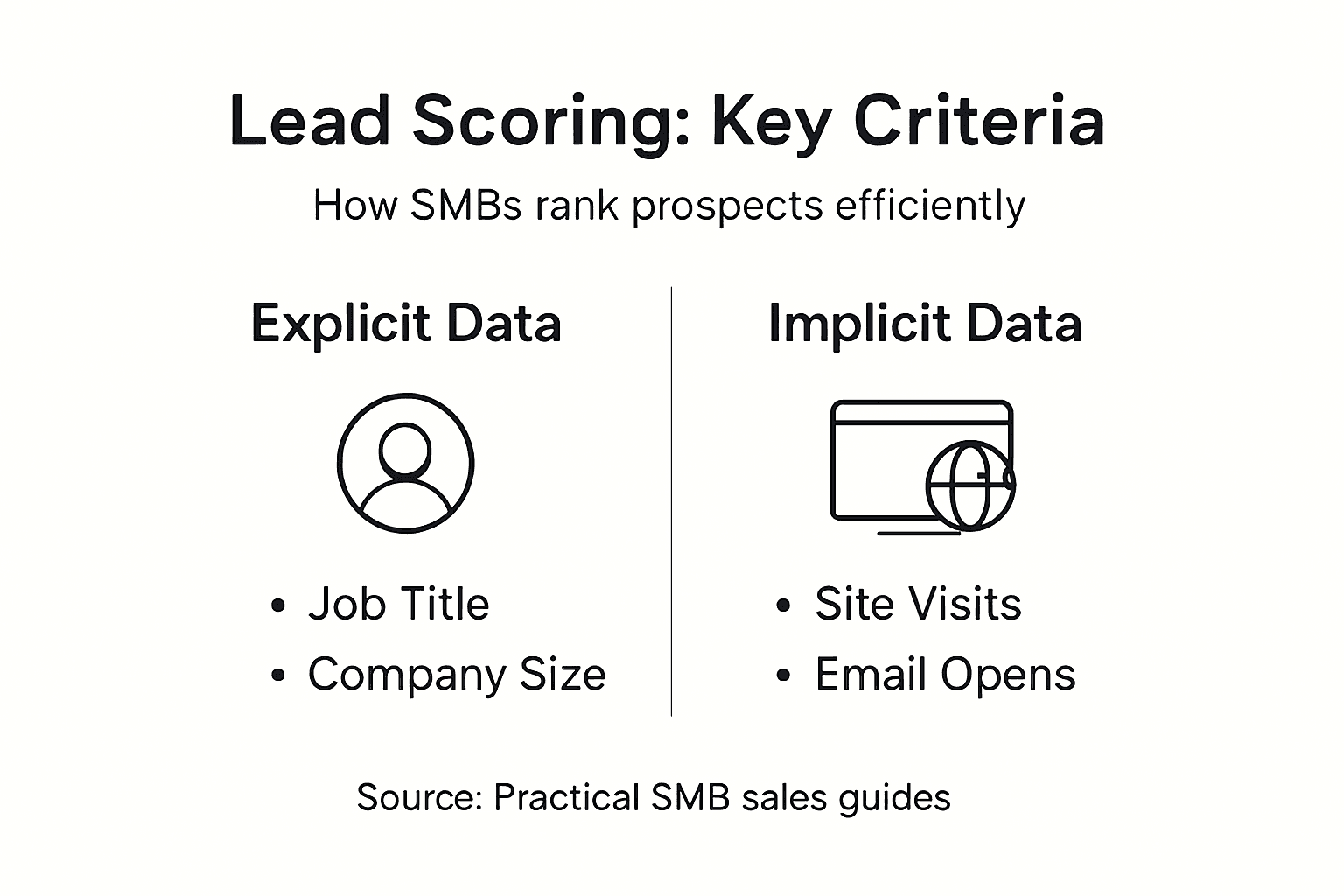
The foundation of effective lead scoring combines two types of data. Explicit data includes the factual information prospects give you directly: their company size, job title, industry, location, and budget. For a Florida HVAC business, knowing that a prospect manages maintenance for a 200-unit apartment complex in Miami tells you something concrete about their potential value. Implicit data comes from what prospects actually do online: they visit your website pages, download guides, click email links, attend webinars, or engage with your content. Lead scoring methodology uses both types together to create a complete picture. A prospect from a local construction firm who visited your website twice and downloaded your hurricane-prep checklist is showing buying signals. Someone who just filled out a contact form but never engaged further is showing interest, but not urgency.
What makes lead scoring particularly valuable for small service businesses is the alignment it creates between your sales and marketing teams. Both sides need to agree on what qualifies a lead. Marketing might think a lead is anyone who fills out a form, while sales might only consider someone ready if they’ve spoken directly about budget and timeline. When you establish clear scoring criteria and thresholds, everyone works from the same playbook. Your marketing team knows exactly what behaviors and attributes your sales team needs to see before a lead gets handed over. This shared language prevents wasted conversations and helps your team convert more prospects into actual customers. For small businesses especially, this alignment means your limited resources go toward leads with genuine buying potential.
Implementing lead scoring also creates accountability and helps you improve continuously. You track which leads convert and which ones don’t, then use that data to refine your scoring model. Maybe you discover that prospects from dental offices in Broward County convert at twice the rate of other service businesses, so you weight that geographic and industry data higher. Or perhaps website visitors who spend more than three minutes on your conversion-focused pages are significantly more likely to become customers. These insights let you calibrate your scoring system to match your actual market.
Pro tip: Start with just five scoring factors (like company size, job title, industry, website engagement, and email opens) rather than trying to track dozens of attributes at once. Once you see which factors actually predict conversions in your business, you can expand from there.
Types of Lead Scoring Models and Criteria
Not every business needs the same lead scoring approach, and that’s the beauty of it. You have options depending on your team size, budget, and how much data you’re willing to track. The Ideal Customer Profile (ICP) model is the gold standard for most small service businesses in Florida. You identify your best existing customers and reverse engineer what they have in common. Maybe your best clients are commercial contractors managing projects between $50,000 and $500,000, located within 30 miles of your office, and have been in business for at least five years. You then score new prospects based on how closely they match those attributes. If someone fits most or all of these criteria, they score higher. This approach works because you’re not guessing what makes a good lead; you’re letting your actual customer data tell you.
For businesses just getting started with lead scoring, the simple qualification model (sometimes called the lamb or spam method) might be your first stop. This is straightforward: you have basic qualifying questions that separate real prospects from tire kickers. Does this prospect operate in your service area? Do they have a genuine business need? Have they shown engagement beyond a single form submission? You can score these factors manually at first, and as you gather more data, you can get more sophisticated. Various lead scoring methodologies exist because different business models require different approaches. A plumbing company with service calls might weight location and company type heavily. A digital marketing agency might prioritize engagement metrics like website time spent and content downloads. The key is matching your model to what actually drives conversions in your specific market.
Your scoring criteria should pull from three buckets: firmographics, demographics, and behavior. Firmographics are company characteristics like industry, company size, revenue, and location. For a Florida HVAC contractor, a commercial property management company with 50+ buildings scores higher than a single homeowner. Demographics cover individual details like job title, seniority level, and decision-making authority. The facilities manager at a hospital has more buying power than an administrative assistant. Behavioral signals show intent: website page visits, email open rates, download activity, form submissions, and how recently they engaged. Someone who visited your services page yesterday carries more weight than someone who clicked a link three months ago. Mix these three categories thoughtfully, and you’ll build a model that actually predicts who buys.

Start simple and evolve. You don’t need a complex algorithm on day one. Many small business owners score leads manually using a spreadsheet with 5 to 10 factors, giving each a point value. As your lead volume increases and you gather conversion data, you can refine weights and thresholds. Track which leads you convert and which ones go nowhere, then adjust your model to match reality.
Here’s a comparison of lead scoring model types and their ideal use cases:
| Model Type | Best For | Key Attributes | Implementation Complexity |
|---|---|---|---|
| Ideal Customer Profile | Established service businesses | Uses past customer data for criteria | Moderate |
| Simple Qualification | New or small businesses | Manual questions, basic indicators | Low |
| Engagement-Weighted | Digital agencies or e-commerce | Scores based on behavioral online actions | Moderate to High |
Pro tip: Assign explicit numeric point values to each criterion (like “Tampa-based prospect: +10 points, Commercial property: +15 points, Website visit this month: +5 points”) so your team scores leads consistently without guessing or playing favorites.
How Lead Scoring Automates Follow-Ups
Here’s where lead scoring transforms from interesting theory into real business results: automation. Once you’ve built a scoring system, you connect it to automated follow-up workflows that do the heavy lifting for you. When a prospect’s score crosses a threshold you’ve set, the system automatically triggers action. Maybe that means sending them a specific email sequence, assigning them to a sales rep, or adding them to a nurture campaign. You’re not manually checking spreadsheets and deciding who to call anymore. The system handles it. For small teams with limited sales staff, this is the difference between handling ten leads a month and a hundred.
Timing matters enormously in sales, and automation ensures you never miss a peak moment. Lead response management practices emphasize that speed matters when someone shows buying intent. If a prospect visits your pricing page at 2 PM on a Tuesday, that’s when their interest is hottest. A human-driven follow-up system might not reach them until Thursday or never. An automated system triggers within minutes or even seconds. This reduces what researchers call “lead decay effect.” The longer you wait to contact someone, the less likely they are to convert. A prospect who gets a relevant email response within an hour of visiting your website is exponentially more likely to engage than one who receives the same message two days later. Your automation tool watches for these behavioral signals continuously and responds instantly.
What automation also delivers is consistency and persistence. With manual follow-ups, some leads get contacted three times while others get forgotten. Automated lead scoring systems enable real-time updates based on every interaction, ensuring nobody falls through the cracks. When someone opens an email, downloads a guide, or visits your website again, their score adjusts automatically. If they go inactive, negative scoring can de-prioritize them so your team’s attention stays on hot prospects. You can also set up multi-touch workflows that keep prospects engaged with the right content at the right stage. A prospect who filled out a form but hasn’t purchased yet gets one sequence. A prospect who requested a quote gets a different sequence focused on objection handling and closing. The system manages all of this without manual intervention, freeing your team to actually close deals instead of managing lists.
For service businesses especially, this automation creates accountability and visibility. You can see exactly when leads were contacted, what message they received, and how they responded. Your sales team isn’t guessing whether follow-ups happened; the system has a complete audit trail. You can also measure what’s working. If automated emails to high-scoring leads convert at 12% but low-scoring leads convert at 2%, you know your model is working. If they’re equal, you know something needs adjustment.
Pro tip: Set up at least two follow-up workflows: one for high-scoring leads (contact within one business day) and one for medium-scoring leads (nurture over two weeks), so your team prioritizes hot prospects while still developing emerging opportunities.
Common Lead Scoring Mistakes to Avoid
Most small business owners start lead scoring with genuine enthusiasm, then watch it fail quietly because they made one of several predictable mistakes. The biggest one? Sales and marketing teams never actually agreed on what a qualified lead looks like. Marketing thinks a lead is anyone who fills out a contact form. Sales thinks a lead needs to have a specific budget, timeline, and decision-making authority. You end up passing leads to sales that they immediately reject, which kills trust between departments and wastes everyone’s time. Before you build any scoring system, sit down with your sales team and get specific. A qualified lead for your electrical contracting business might be a commercial property manager in Southeast Florida managing at least five buildings. Write it down. Make it clear. Then build your scoring model to match that definition.
Another common pitfall is relying only on explicit data like company size and job title while ignoring behavioral signals. You might give someone a high score because they work for a Fortune 500 company, but if they never open your emails and never visit your website, they probably aren’t actually interested. Lead scoring mistakes include neglecting implicit data, which tells you what someone actually cares about. Someone from a small local dental practice who visits your website twice a week, downloads your content, and opens every email is worth far more than a big company prospect who went silent after one form submission. Mix your explicit and behavioral data thoughtfully. Also, don’t forget negative scoring. This is where you subtract points when prospects show signs of being poor fits. Someone outside your service area, a student organization, a competitor trying to gather intel. Subtract points when engagement drops off. This keeps your sales team focused on real opportunities instead of chasing dead ends.
Threshold mistakes also haunt small business scoring systems. You set your threshold too high, so only perfect prospects qualify, and your sales team sits idle. Or you set it too low, and they’re overwhelmed with barely qualified leads and ignore the good ones. Start conservatively. Maybe you decide that a score of 50 or higher qualifies for sales contact. Then track what actually converts. If high-scoring leads convert at 8% and medium-scoring leads convert at 3%, your threshold is probably right. If both groups convert equally, your scoring criteria need adjustment. The mistake isn’t getting it perfect on day one. The mistake is never updating it. Lead scoring requires continuous monitoring and refinement based on real conversion data. Spend 15 minutes per month reviewing which leads converted and which didn’t. Ask your sales team what’s working and what isn’t. Then tweak your model. Small adjustments compound into dramatically better results over time.
This table summarizes common lead scoring mistakes and proactive solutions:
| Common Mistake | Impact on Business | Proactive Solution |
|---|---|---|
| Misaligned team definitions | Wasted sales team time | Create shared scoring criteria |
| Ignoring behavioral activity | Misses active prospects | Combine explicit and implicit data |
| No negative scoring | Chases poor-fit leads | Subtract points for bad signals |
| Outdated thresholds | Low conversion rates | Review and adjust regularly |
Pro tip: Document your scoring rules in a one-page spreadsheet that your entire team can see, update it monthly based on conversion results, and share changes with both sales and marketing so everyone stays aligned on what scores mean.
Choosing Lead Scoring Tools for Florida SMBs
You don’t need enterprise software costing thousands per month to implement lead scoring effectively. The right tool for your Florida business depends on three things: your budget, the complexity of your scoring model, and how well it integrates with what you’re already using. Many small business owners start by bolting lead scoring onto their existing CRM or marketing automation platform. If you’re already using a tool like HubSpot, Pipedrive, or similar, check whether it has built-in lead scoring. Often it does, and you might not need to buy anything new. The key is finding a platform that lets you define custom scoring rules without requiring a developer to write code. You want to change your scoring criteria based on what you learn, not get locked into rigid preset options.
When evaluating any lead scoring tool, ask whether it supports both explicit and implicit scoring, integrates with your website and email platform, and provides real-time updates. Integration matters tremendously. If your tool can’t connect to your website analytics or email provider, you’ll spend hours manually transferring data between systems. That kills adoption quickly. Also look for tools that let you set up automated workflows triggered by score thresholds. If a lead hits 75 points, does the tool automatically send them to sales, trigger an email sequence, or add them to a calendar reminder? If it requires manual intervention, you’ll fall back into old habits. Another consideration is ease of use. Choosing user-friendly tools compatible with existing workflows matters for adoption. A tool that requires three hours of training before anyone can use it won’t work in a small business where everyone wears multiple hats. Look for something intuitive where your sales team can log in, see lead scores, and understand them without calling you every time they have a question.
Cost is real. Some enterprise tools charge hundreds per month for features you don’t need. For small Florida service businesses, a solid all-in-one platform that includes CRM, automation, and lead scoring is often better than stitching together five different tools. You save money, reduce integration headaches, and have a single source of truth for lead data. When evaluating cost, factor in implementation time and training. A cheaper tool that takes six weeks to set up and requires ongoing expert support isn’t actually cheaper. Look for platforms that promise rapid setup, ideally within days. Also ask about customer support. If your lead scoring suddenly breaks or you need help adjusting your model, can you reach a real person during business hours, or are you stuck waiting for a chatbot response? For Florida SMBs, responsive support often justifies a slightly higher price.
Before committing to any tool, test it with real data. Most platforms offer free trials. Spend a week actually using the tool with your current leads. Can your team comfortably score leads? Can you easily adjust scores based on new information? Does reporting show you which leads are converting? If it feels clunky during the trial, it’ll feel worse after you’ve signed a contract. Data analytics capabilities and scalable AI features in modern platforms help Florida SMBs maximize accuracy, so test whether the tool’s analytics dashboard actually shows insights you care about. Finally, pick a tool that grows with you. Your scoring model will get more sophisticated as you learn what works. You need a platform flexible enough to handle that evolution without requiring expensive migrations later.
Pro tip: Start with a tool that has strong free or low-cost tier options, test it thoroughly with your actual leads and workflows over two weeks, and only upgrade to paid features once you’ve confirmed the basic scoring model actually works for your business.
Supercharge Your Lead Scoring with Nimblo.ai
Struggling to align your sales and marketing teams or wasting time chasing low-quality leads? This article highlights how effective lead scoring transforms your SMB’s ability to prioritize prospects based on firmographics, behavior, and engagement. Nimblo.ai offers a complete SaaS platform tailored for Florida small and medium businesses that simplifies lead scoring by integrating CRM, marketing automation, and AI-powered local SEO into one affordable solution. Say goodbye to juggling multiple tools and hello to a streamlined system that automates scoring, follow-ups, and prioritization so your team focuses on leads that truly convert.
Ready to turn your lead scoring theory into real growth? Explore how Nimblo.ai accelerates setup and delivers consistent local market insights combined with automated workflows to boost conversion rates. Take control of your prospect pipeline today with Nimblo.ai’s all-in-one platform designed specifically for Florida SMBs. Don’t wait for another missed opportunity. See how simple and powerful lead management can be by getting started now at Nimblo.ai and discover how you can reduce costs while increasing lead quality with our rapid setup solution.
Frequently Asked Questions
What is lead scoring and why is it important for small businesses?
Lead scoring is a system that ranks prospective customers based on their potential value to your business. It helps small businesses focus on leads that are more likely to convert, effectively managing resources and improving conversion rates.
How can I implement lead scoring in my small business?
To implement lead scoring, start by defining your Ideal Customer Profile (ICP) and identifying explicit and implicit data you want to track. Begin with a few key scoring factors, then gradually refine your scoring model based on what drives conversions in your specific market.
What types of data should I consider for effective lead scoring?
Effective lead scoring combines explicit data (like job title, company size, and location) and implicit data (like website visits, content downloads, and engagement with emails) to provide a comprehensive view of a lead’s potential.
What are common mistakes to avoid when setting up lead scoring?
Common mistakes include misalignment between sales and marketing teams regarding what qualifies as a lead, relying solely on explicit data while ignoring behavior signals, and neglecting to set appropriate scoring thresholds that can accurately predict conversions.